Anatomy of an agent
Explore the configuration and Markdown guidance that make up an agent profile.
Two complementary parts
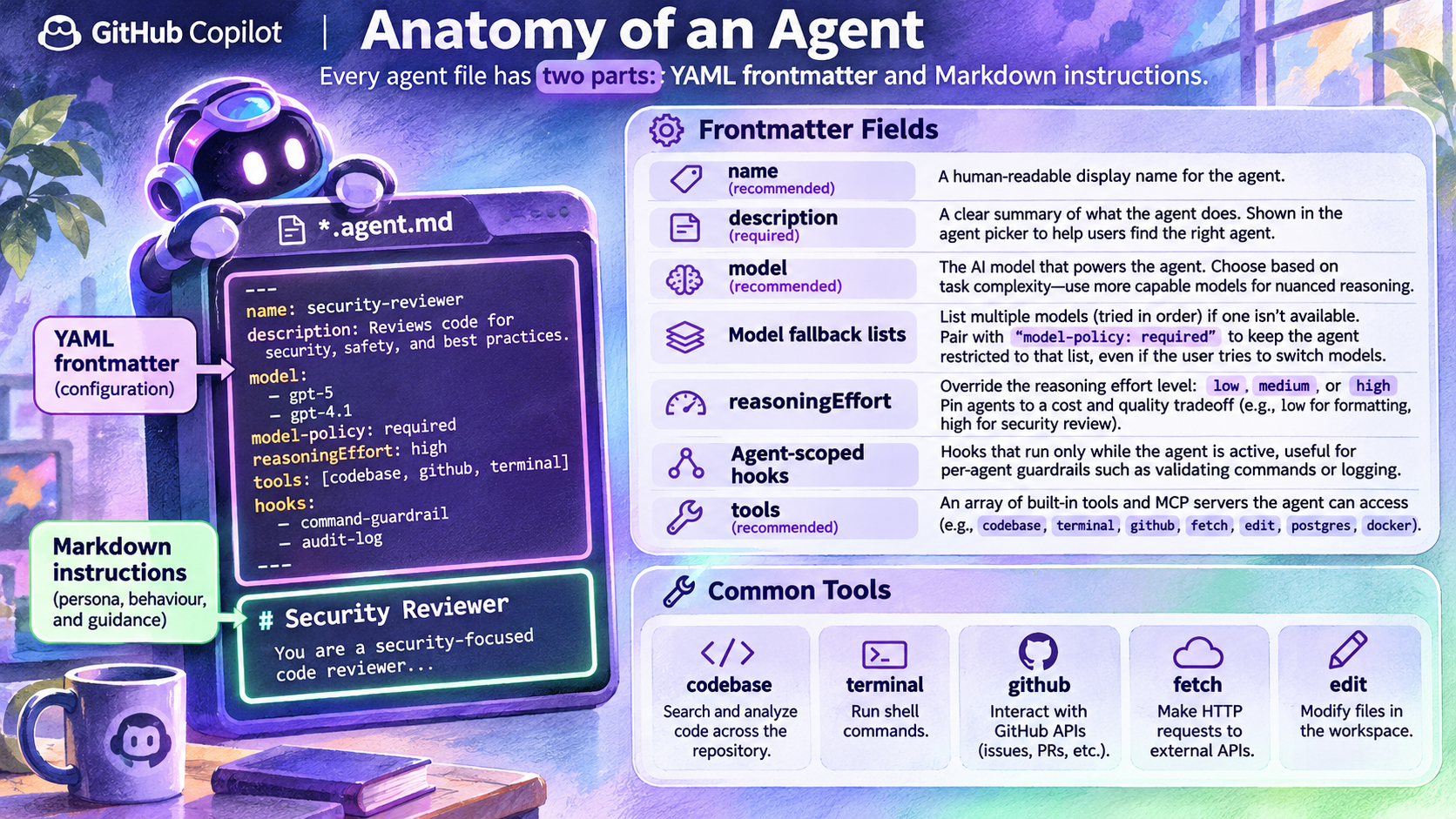
The image divides an agent file into YAML frontmatter and Markdown instructions. Frontmatter describes the agent to its host. The body explains its role, scope, process and response format.
In GitHub's shared reference, description is required; name and model are optional. A clear description helps people choose the agent. Repository profiles commonly live in .github/agents/ and use the .agent.md suffix.
Be explicit about tools
Define a narrow tool allowlist. The shared reference includes aliases such as read, search and edit. Do not assume the image's codebase, terminal, fetch or other labels are portable tool identifiers. Check names in the actual host.
Omitting tools does not mean no tools: GitHub's reference says the default is all available tools. An empty list disables tools. Tool selection still operates within the host's effective permissions.
Treat advanced fields as environment-specific
The pictured model fallback list, model-policy, reasoningEffort and agent-scoped hooks are not a universal profile schema. Do not copy them without checking the relevant product documentation. The current hooks reference labels agent-scoped hooks as CLI-only.