Chapter 5 - Azure + AI Extension
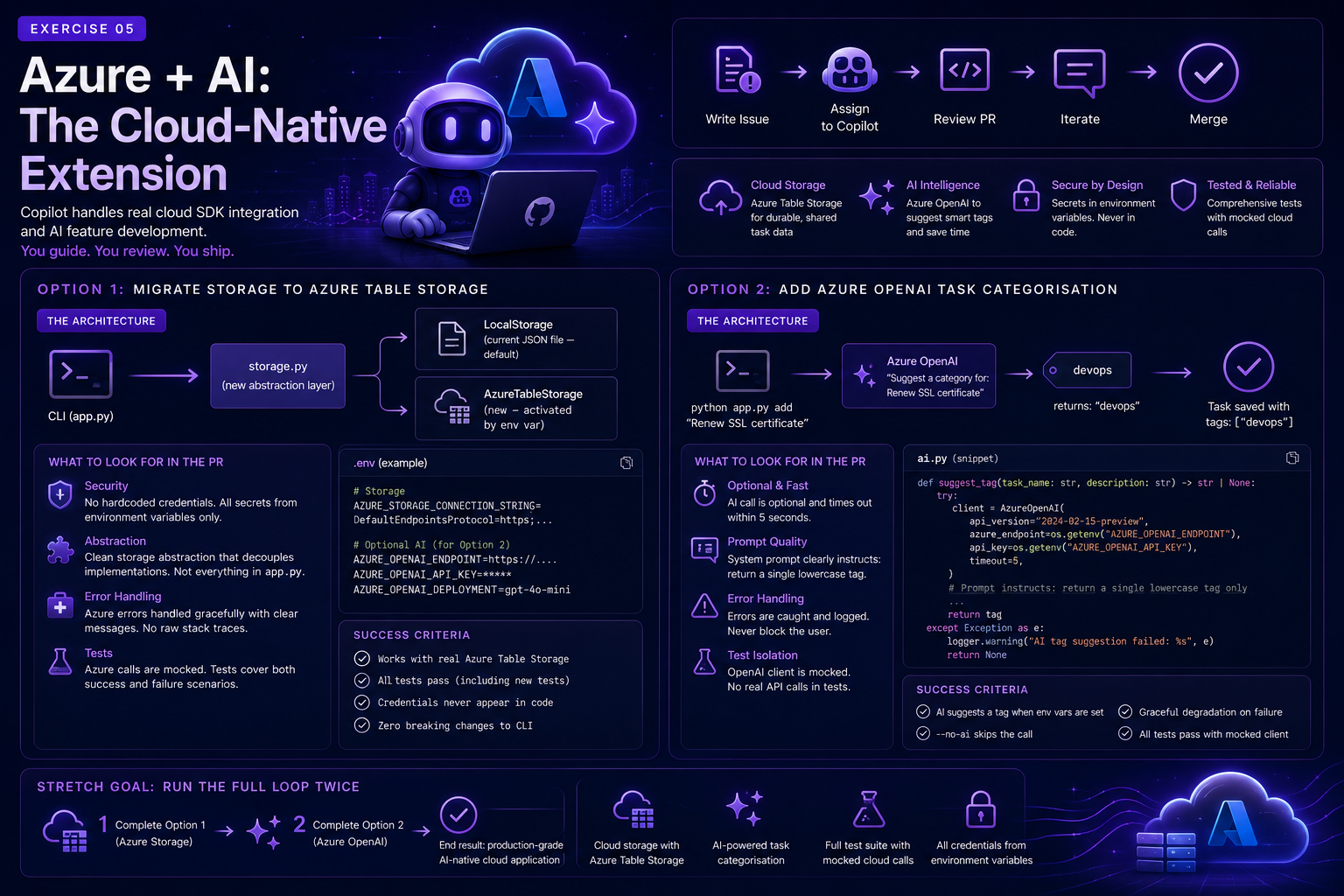
This chapter introduces production-flavored requirements: cloud SDKs, credentials, resilience, and optional AI augmentation.
Goal
See how Copilot handles real cloud SDK integration and AI feature development, and understand what makes these tasks both impressive and risky to delegate.
Why This Is Different
In the previous chapters, Copilot extended a local Python app. Now you'll write issues that require Copilot to:
- Use the Azure SDK for cloud storage (
azure-data-tables) - Call Azure OpenAI to add AI behaviour at runtime
- Handle secrets safely using environment variables
- Write tests that mock cloud calls
This is a meaningful complexity jump. It's also where the quality of your issue and your review skills matter most.
Why these architecture patterns matter
Storage abstraction
A TaskStorage interface keeps the CLI stable while swapping persistence backends (local JSON vs Azure Table Storage). This reduces coupling and allows safer rollout, testing, and fallback behaviour.
Graceful degradation
AI-assisted features should not block core user flows. If credentials are missing or a model call fails, users should still complete tasks normally.
These two patterns are essential in real systems where cloud dependencies can be intermittent.
Option 1: Migrate Storage to Azure Table Storage
The Architecture
CLI (app.py)
    └─► storage.py  (new abstraction layer)
            ├─► LocalStorage (current JSON file - default)
            └─► AzureTableStorage (new - activated by env var)
When AZURE_STORAGE_CONNECTION_STRING is set, the app uses Azure Table Storage. Otherwise it falls back to the local JSON file. Zero breaking changes.
Pre-Written Issue
Use this as your Chapter 1 issue (Option A), or create a new issue with this content now:
Title: Migrate task storage to Azure Table Storage
Problem statement:
Tasks are currently stored in a local JSON file (tasks.json). This means data is lost when the machine changes and cannot be shared across devices. We need a cloud-backed storage option.
Desired behaviour:
- When the AZURE_STORAGE_CONNECTION_STRING environment variable is set, tasks are stored in and retrieved from an Azure Table Storage table named tasks.
- When the environment variable is not set, the app falls back to the existing local JSON file behaviour.
- All existing CLI commands (add, list, complete, edit, delete, stats) work identically regardless of which storage backend is active.
Acceptance criteria:
- [ ] A new storage.py module defines a TaskStorage protocol with load() -> list[dict] and save(tasks: list[dict]) -> None methods
- [ ] LocalStorage implements TaskStorage using the existing JSON file approach
- [ ] AzureTableStorage implements TaskStorage using azure-data-tables
- [ ] app.py calls get_storage() to obtain the correct implementation at startup
- [ ] AZURE_STORAGE_CONNECTION_STRING is loaded from a .env file using python-dotenv if present
- [ ] If the env var is set but the connection fails, the app prints a clear error and exits with code 1
- [ ] azure-data-tables and python-dotenv are added to requirements.txt
- [ ] Tests cover both storage implementations (mock Azure calls with unittest.mock)
- [ ] No connection strings or account keys appear in source code
Constraints:
- Use azure-data-tables (not the older azure-storage-table SDK)
- Use PartitionKey = "tasks" and RowKey = str(task["id"]) for Azure entities
- Do not change the CLI interface or task schema
Definition of Done:
- [ ] python app.py add "Test" && python app.py list works with a real Azure Storage account
- [ ] All existing tests still pass
- [ ] New tests cover AzureTableStorage with mocked Azure calls
What to Look for in the PR
When reviewing Copilot's implementation, pay particular attention to:
- Does it hardcode any credentials? This is a critical security failure if so.
- Does the storage abstraction actually decouple the two implementations? Or did it inline everything in
app.py? - Are Azure errors handled gracefully? Or do they produce raw Python stack traces?
- Are the tests actually isolated? Azure calls must be mocked, not real.
Option 2: Add Azure OpenAI Task Categorisation
The Architecture
python app.py add "Renew SSL certificate"
    └─► Azure OpenAI: "Suggest a category for: Renew SSL certificate"
            └─► returns: "devops"
                    └─► task saved with tags: ["devops"]
Pre-Written Issue
Title: Add Azure OpenAI smart tag suggestion to add command
Problem statement: Users often forget to tag tasks when adding them. We want to use Azure OpenAI to suggest a single category tag automatically when no tags are provided.
Desired behaviour:
- When AZURE_OPENAI_ENDPOINT, AZURE_OPENAI_API_KEY, and AZURE_OPENAI_DEPLOYMENT are all set AND the user does not provide any --tag arguments, call Azure OpenAI to suggest a single tag for the task.
- The suggested tag is added automatically and displayed to the user: [AI suggested tag: devops]
- If any of the env vars are missing, or if the AI call fails, the task is saved without a tag (graceful degradation, never block the user).
- Add a --no-ai flag to add that skips the AI suggestion entirely.
Acceptance criteria:
- [ ] suggest_tag(task_name: str, description: str) -> str | None function in a new ai.py module
- [ ] Uses openai.AzureOpenAI with credentials from environment variables
- [ ] System prompt instructs the model to return a single lowercase tag (no punctuation)
- [ ] add command calls suggest_tag only when no --tag flags are provided and --no-ai is not set
- [ ] Graceful degradation: any exception from the AI call is caught and logged, task is saved normally
- [ ] openai added to requirements.txt
- [ ] Tests for suggest_tag mock the OpenAI client, no real API calls in tests
Constraints:
- The AI call must not block the user for more than 5 seconds (use timeout=5 in the client)
- Never log or print the raw API key
- The --no-ai flag is documented in --help
Definition of Done:
- [ ] python app.py add "Deploy to production" with env vars set shows an AI-suggested tag
- [ ] python app.py add "Deploy" --no-ai skips the AI call
- [ ] All existing tests still pass
- [ ] New tests cover suggest_tag with mocked responses and error cases
What to Look for in the PR
- Is the AI call truly optional? The app must work even when the env vars are not set.
- Is the timeout enforced? A slow OpenAI call should not block the CLI.
- Is the prompt well-designed? Ask Copilot to show you the system prompt, does it constrain the output format clearly?
- Are errors swallowed silently? Errors should be caught and logged, not silently ignored.
Stretch Goal: Run the Full Loop Twice
- Complete Option 1 (Azure storage) with Copilot via the AI-native loop from Chapters 1-4.
- After merging, write a new issue for Option 2 (Azure OpenAI) and run the loop again.
By the end, you'll have an app that: - Stores tasks in Azure Table Storage - Auto-categorises tasks with AI on creation - Has a full test suite with mocked cloud calls - Loads all credentials from environment variables
That is a production-grade AI-native cloud application, built through collaboration between you and Copilot.
Production review checkpoints
- Are credentials loaded only from environment variables?
- Is fallback behavior deterministic and tested?
- Are cloud/API calls mocked in tests?
- Are failure messages clear but non-sensitive?
Next Steps
- Read the Azure Table Storage Python quickstart
- Read the Azure OpenAI Python quickstart
- Move on to Chapter 6 - Resources and Next Steps