Keynote - Agentic Coding: What does it actually mean?
The vibe shift
For the last couple of years, "AI in your app" meant a chat box bolted onto the side of a product. That era is over. In 2026, the app increasingly is the agent: it plans, it calls tools, it edits files, it opens pull requests, and it does all of that with a level of autonomy that used to require a human at the keyboard.
That's the "vibe shift" at the heart of this keynote: you are not behind, you are exactly where you need to be. The skills that make a good engineer - reading code critically, understanding systems, thinking about risk and blast radius - are more relevant than ever, not less. Agentic coding doesn't remove the need for engineering judgement; it moves that judgement earlier, into how you scope, supervise, and review the agent's work.
What is an AI agent, actually?
Strip away the marketing and an agent is a loop:
1. Perceive
Read the repository, the issue, the terminal output, the test failures - whatever context it's been given.
2. Reason
Plan the next step using a language model, weighing tools available and constraints in force.
3. Act
Call a tool - run a command, edit a file, open a PR, query an API - inside the permissions it's been granted.
4. Observe
Look at the result, decide whether the goal is met, and loop back to reasoning if not.
Every step in that loop is also, worth remembering, an attack surface. A malicious file, a poisoned dependency, or a crafted issue comment can all attempt to steer the "reason" step. That's why the second half of this talk track (context, governance, and the SDK sessions) matters just as much as the productivity story.
Seven primitives, one system
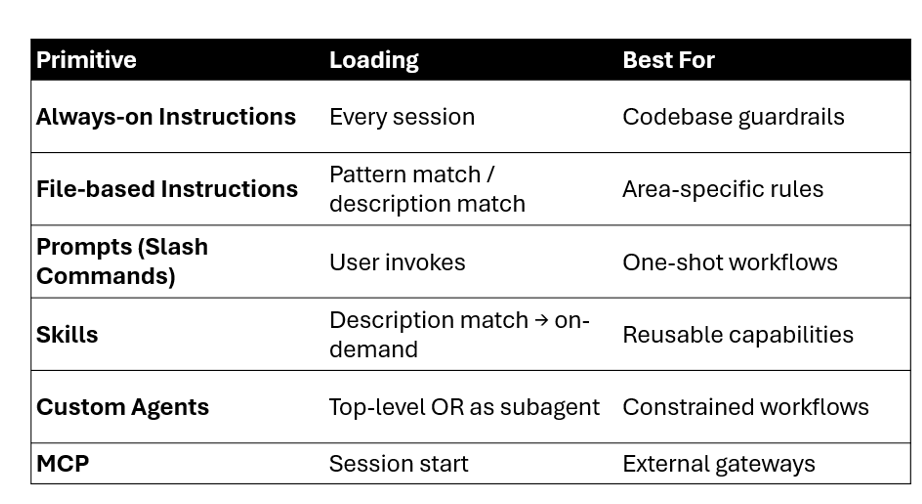
Everything Copilot does reduces to a small set of customization primitives. Each one loads differently and is suited to a different job:
| Primitive | Loading | Best for |
|---|---|---|
| Always-on instructions | Every session | Codebase guardrails - the persistent, passive rules the whole team agrees on |
| File-based instructions | Pattern / description match | Area-specific rules, e.g. "here's how we write C#" or "here's how our CSS and test files look" |
| Prompts (slash commands) | User invokes | One-shot workflows - the active trigger a person fires deliberately |
| Skills | Description match → on-demand | Reusable, on-demand expertise - bundled scripts, templates and resources that load only when relevant |
| Custom agents / chat modes | Top-level or as subagent | Constrained workflows - putting the agent into a specific mindset, like Plan mode or a conversational Interactive mode |
| MCP | Session start | External gateways - the bridge that lets an agent securely reach out to systems like Azure and bring data back |
The first five give the agent rules, expertise, mindset, and reach - but they're all things you configure up front. The sixth primitive is different: memory is the first one the agent writes back to itself.
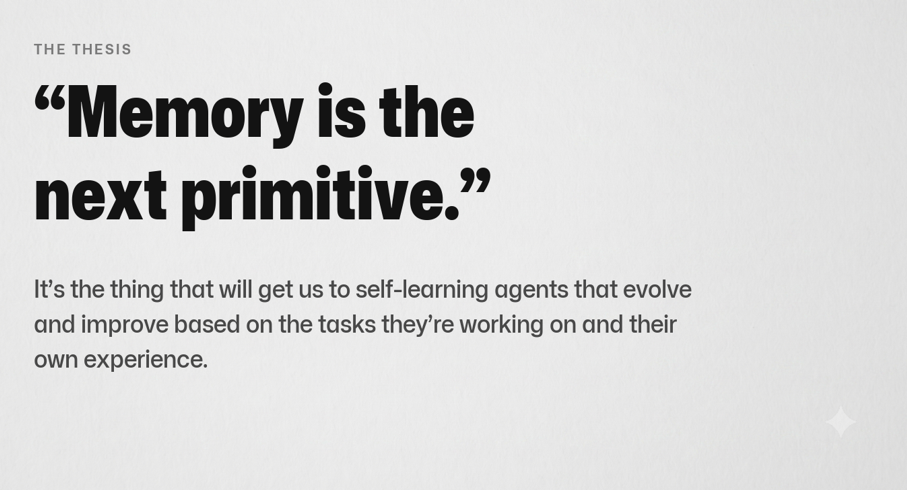
"Memory is the next primitive. It's the thing that will get us to self-learning agents that evolve and improve based on the tasks they're working on and their own experience."
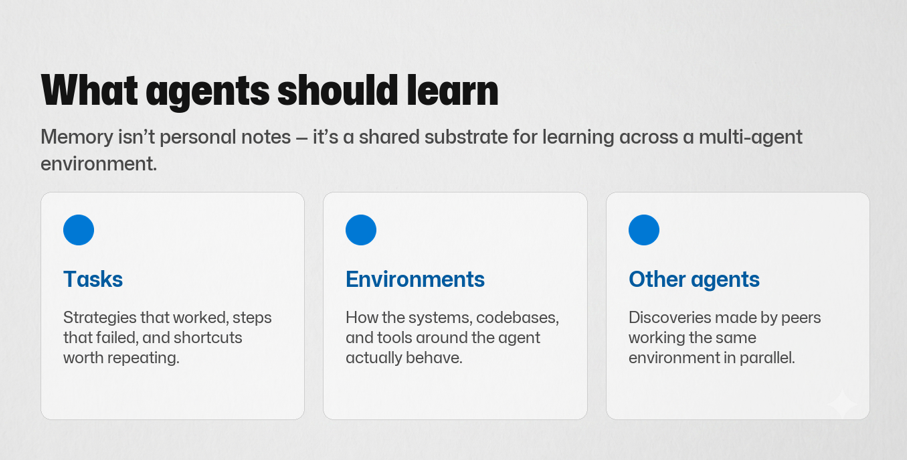
Memory isn't personal notes - it's a shared substrate for learning across a multi-agent environment, built from three sources:
Tasks
Strategies that worked, steps that failed, and shortcuts worth repeating.
Environments
How the systems, codebases, and tools around the agent actually behave.
Other agents
Discoveries made by peers working the same environment in parallel.
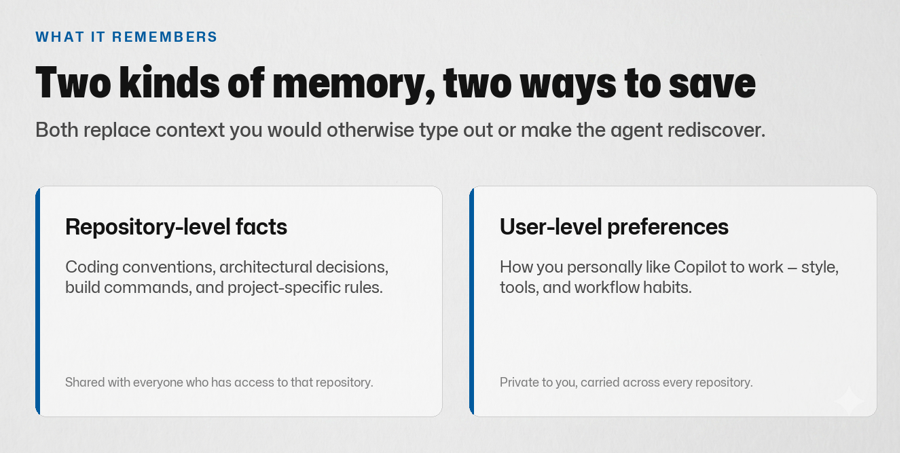
In practice, that comes down to two kinds of memory, saved in two different places, both replacing context you'd otherwise have to type out or make the agent rediscover every time:
Repository-level facts
Coding conventions, architectural decisions, build commands, and project-specific rules. Shared with everyone who has access to that repository.
User-level preferences
How you personally like Copilot to work - style, tools, and workflow habits. Private to you, carried across every repository.
The agent spectrum
Not all agents are equal, and your posture should match the level of autonomy in play:
- Assisted - suggestions only, human types every change (classic autocomplete).
- Supervised - the agent proposes a batch of changes, a human approves each tool call or diff before it lands.
- Delegated - the agent runs a scoped task end-to-end (e.g. "fix this failing test") and opens a PR for review.
- Autonomous / multi-agent - multiple agents coordinate on longer-running work with minimal human intervention, checked by policy and CI rather than a person watching every step.
The further right you move on that spectrum, the more your security, review, and audit practices need to catch up - which is exactly what the rest of today's sessions cover.
Two multi-agent patterns worth knowing
"Autonomous / multi-agent" isn't one thing - it's at least two genuinely different shapes, and each flips a different variable to get more out of the same task. Both patterns pair a frontier model (expensive, high capability) with a lightweight model (cheap, fast) - they just decide differently which one is in charge.
Pattern 1 · Advisor - the cheap model runs the show
This pattern flips the assumption most people have: the expensive model isn't the one driving. The cheap model runs the main loop and calls a frontier model only when it needs to - once before it commits to a plan, once after, to mark its own homework.
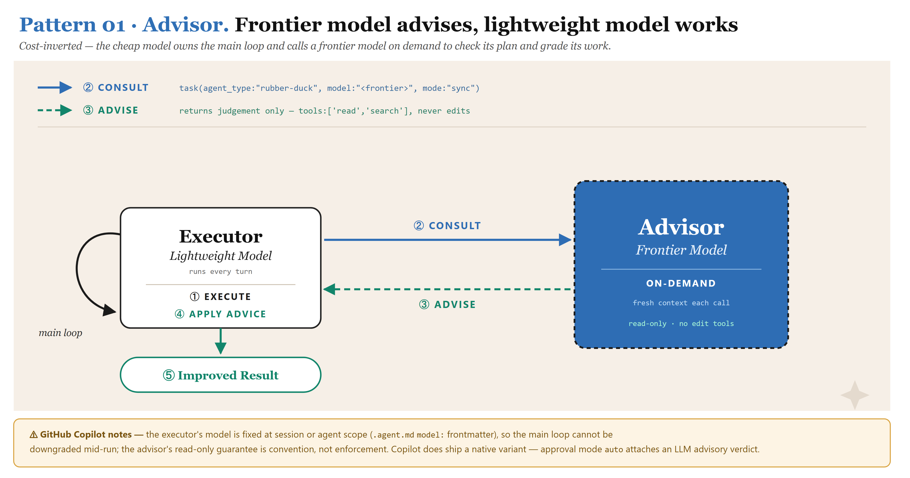
- The Executor runs every turn. A lightweight model understands what the code, design, or proposal is trying to accomplish, how it integrates with the rest of the system, and what assumptions exist.
- When it hits a judgement call - is this plan sound, did I actually fix the bug - it consults. It looks for bugs, logic errors, security vulnerabilities, design flaws, anti-patterns, performance bottlenecks, and other problems that genuinely matter to the success of the task.
- The Advisor returns judgement only. It states the issue, its impact, and a concrete suggested change - it does not act.
- The Executor applies that advice and acts accordingly.
- Result: improved results, with a fraction of the frontier model's bill.
Copilot ships this pattern out of the box as the built-in rubber-duck agent: it runs on a different model from the one driving your session, and a different model family brings a genuinely complementary perspective - the critic is less likely to share the same blind spots as the model that produced the work.
Learn more: About the rubber duck agent.
Pattern 2 · Orchestrator - the frontier model runs the team
The second pattern inverts the first: the frontier model stays in charge and delegates the legwork to a team of cheap workers running in parallel.
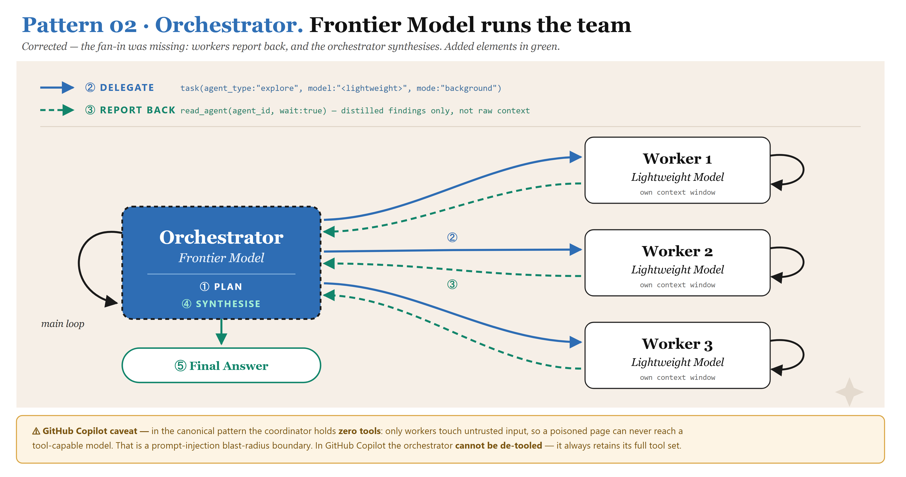
- The Orchestrator plans. It takes the problem and breaks it into sub-questions.
- It delegates. One call per sub-question, all fired off in parallel, each pinned to a lightweight model. Each subagent has its own context window, which can process information that isn't relevant to the main agent - so parts of the work get offloaded without cluttering the main agent's context window, and it can focus on higher-level planning and coordination.
- Workers report back with distilled findings, not raw context. For example, fifty thousand tokens' worth of source files get read by the cheap model and come back as a paragraph - the expensive model never pays for that reading.
- The Orchestrator synthesises, and 5) delivers one coherent answer.
Why it pays - two independent wins that build on each other:
- Cost - the token-heavy reading bills at the worker rate, not the frontier rate.
- Latency - the workers run concurrently, so three workers on three sub-questions takes roughly one worker's time, not three.
Measured against a solo frontier agent on the same question with the same verification standard, this pattern came out around 2.5x cheaper and 3x faster, with 84–98% of input tokens billed at the worker rate.
This is exactly the pattern that GitHub Agentic Workflows
(gh-aw) is built to help you run safely
in your own repositories: agentic automation defined in Markdown with YAML
frontmatter, compiled into standard GitHub Actions workflows, with agent
jobs read-only and sandboxed by default and writes applied through validated,
scoped safe-outputs jobs.
Cloud-native agents in the SDLC
Agents aren't just showing up at the coding step. Expect to see them across the whole delivery lifecycle: triaging issues, writing and reviewing PRs, investigating incidents, updating dependencies, and summarising release notes. Each of those stages has its own tools, its own blast radius, and its own governance question - "what is this agent allowed to touch, and who is accountable if it gets it wrong?"
Where this leads
The rest of today builds directly on this idea: Getting hands on with the GitHub App and CLI shows the surfaces you'll actually use, Context management and optimization covers how to keep long agent sessions accurate, and GitHub SDK and Microsoft Foundry shows how to embed this pattern in your own products.