Context management and optimization
Why context is the real bottleneck
Every agent surface you saw in the previous session - editor, CLI, app, cloud agent, SDK - shares the same underlying constraint: a finite context window. As a session runs longer, more of that window fills up with tool output, file contents, and conversation history, leaving less room for the model to actually reason well. Poorly managed context shows up as slower responses, higher cost, and - worst of all - an agent that starts forgetting earlier decisions or re-reading the wrong files.
Context management is the discipline of keeping an agent fast, affordable, and accurate as a task grows in size and duration.
Where context comes from
System & instructions
Custom instructions, agent skills, and persona/style guidance loaded at session start.
Repository content
File reads, search results, and directory listings pulled in as the agent explores the codebase.
Tool output
Command output, test results, API responses - often the largest and noisiest contributor.
Conversation history
Every prior turn, including intermediate reasoning, that the model may need to recall.
Techniques that keep sessions healthy
- Auto-compaction - summarising older turns once the session nears a threshold (e.g. ~95% of the context limit) so the agent keeps a compressed memory of what happened rather than losing it outright.
- Scoped tool calls - asking for a targeted
grep/file range instead of dumping whole files or directories into context. - Session isolation - using a fresh worktree or session per task (rather than one long-running mega-session) so unrelated context doesn't leak in.
- Retrieval over recall - re-fetching the exact file or docs section needed at the point of use, instead of trying to keep everything "in mind" from the start.
- Prompt and instruction hygiene - keeping custom instructions and agent skills concise and specific; verbose boilerplate steals space from the parts of context that actually matter for the task at hand.
- Rewind / checkpoint - being able to roll a session's conversation and files back to an earlier point (without relying purely on Git) so a bad branch of exploration doesn't have to be paid for in tokens forever.
The token efficiency mental model
Not every optimisation is equal, and it helps to separate the ones that cost you nothing from the ones that trade away some quality on purpose.
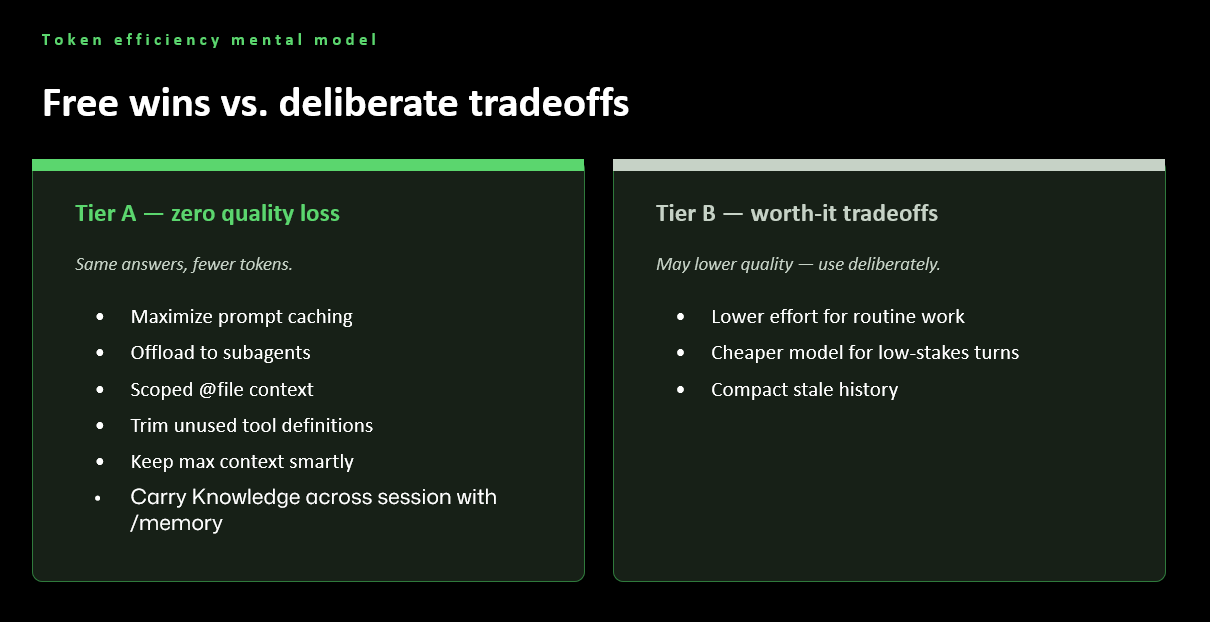
- Tier A - zero quality loss. Same answers, fewer tokens: maximise
prompt caching, offload to subagents, scope
@filecontext, trim unused tool definitions, size context deliberately, and carry knowledge across sessions with/memory. There's no reason not to do all of these, all the time. - Tier B - worth-it tradeoffs. These may lower quality, so use them deliberately: lower reasoning effort for routine work, a cheaper model for low-stakes turns, and compacting stale history when you no longer need the detail.
What "compute" actually means for an LLM
An LLM's inference-time compute isn't just hidden reasoning - it breaks down into three distinct kinds of tokens, and good outcomes come from balancing all three rather than maximising one.
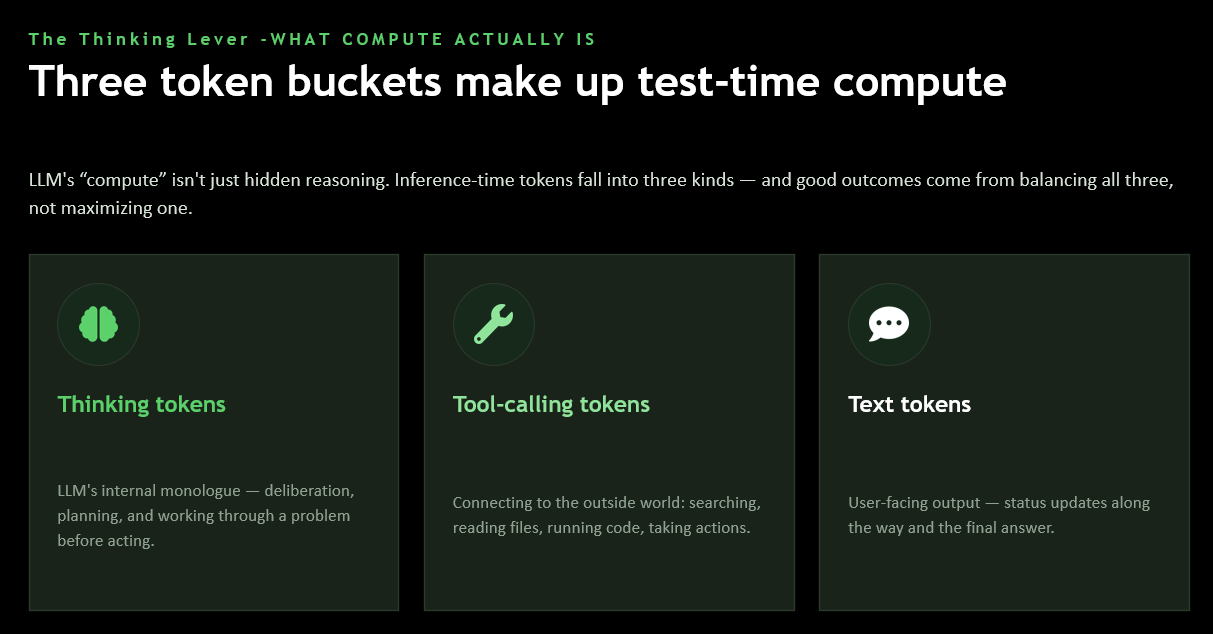
- Thinking tokens - the model's internal deliberation, planning, and working through a problem before acting.
- Tool-calling tokens - connecting to the outside world: searching, reading files, running code, taking actions.
- Text tokens - the user-facing output: status updates along the way and the final answer.
Picking the right model
Choosing a model is a three-way balance, not a single "best" choice:
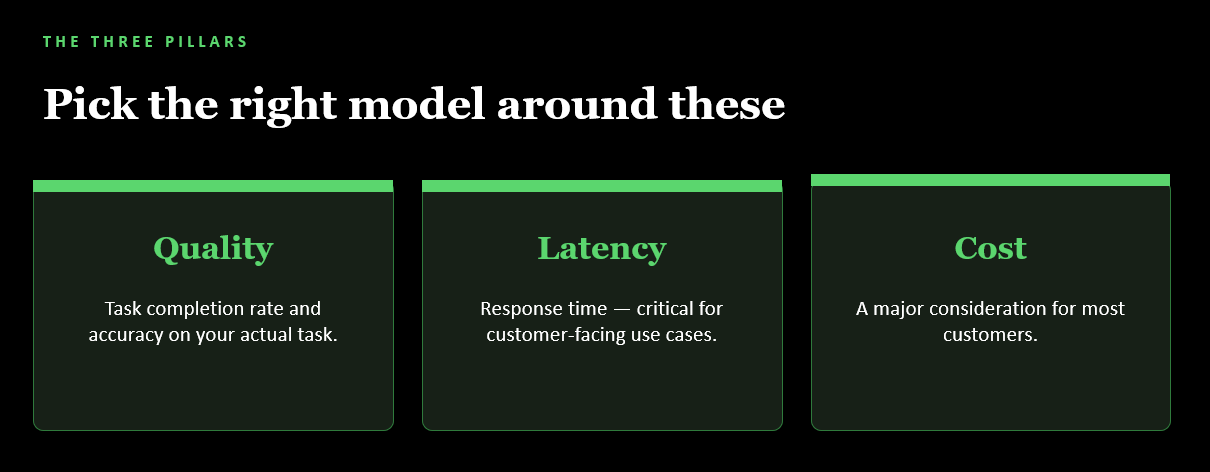
- Quality - task completion rate and accuracy on your actual task.
- Latency - response time, critical for customer-facing use cases.
- Cost - a major consideration for most workloads at scale.
Once you know the pillars, the next question is usually a straight trade-off between model size and reasoning effort:
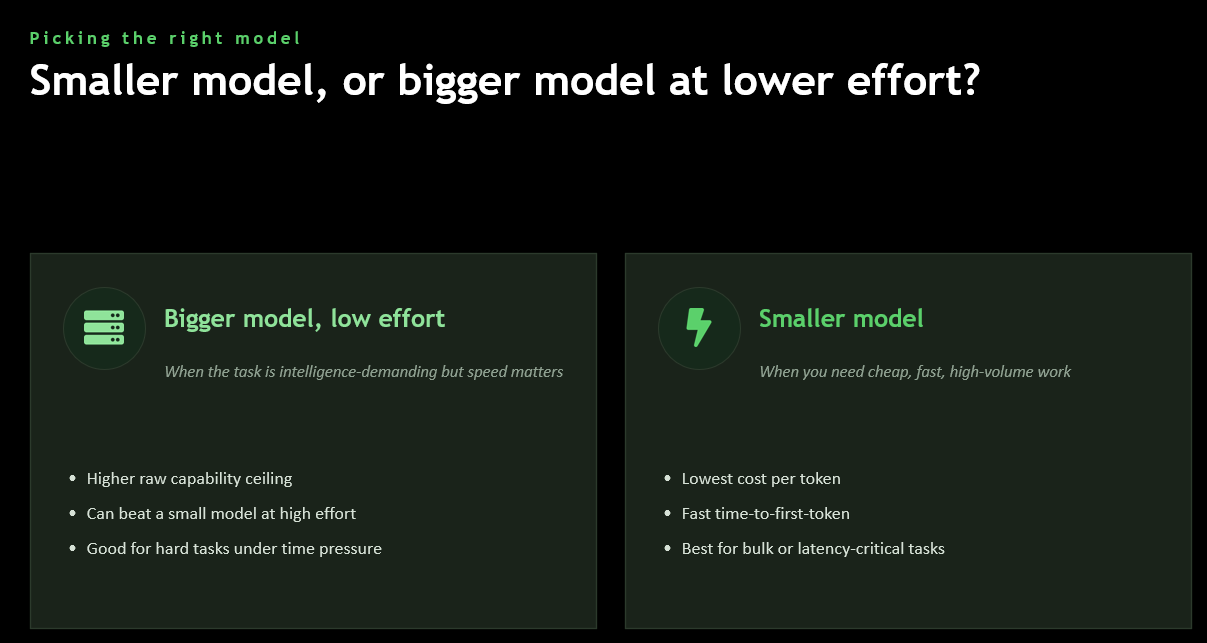
- Bigger model, low effort - for intelligence-demanding tasks where speed still matters. Higher raw capability ceiling, can beat a small model even at high effort, and good for hard tasks under time pressure.
- Smaller model - for cheap, fast, high-volume work. Lowest cost per token, fastest time-to-first-token, and best for bulk or latency-critical tasks.
The way to actually choose between them isn't guesswork - it's evals:
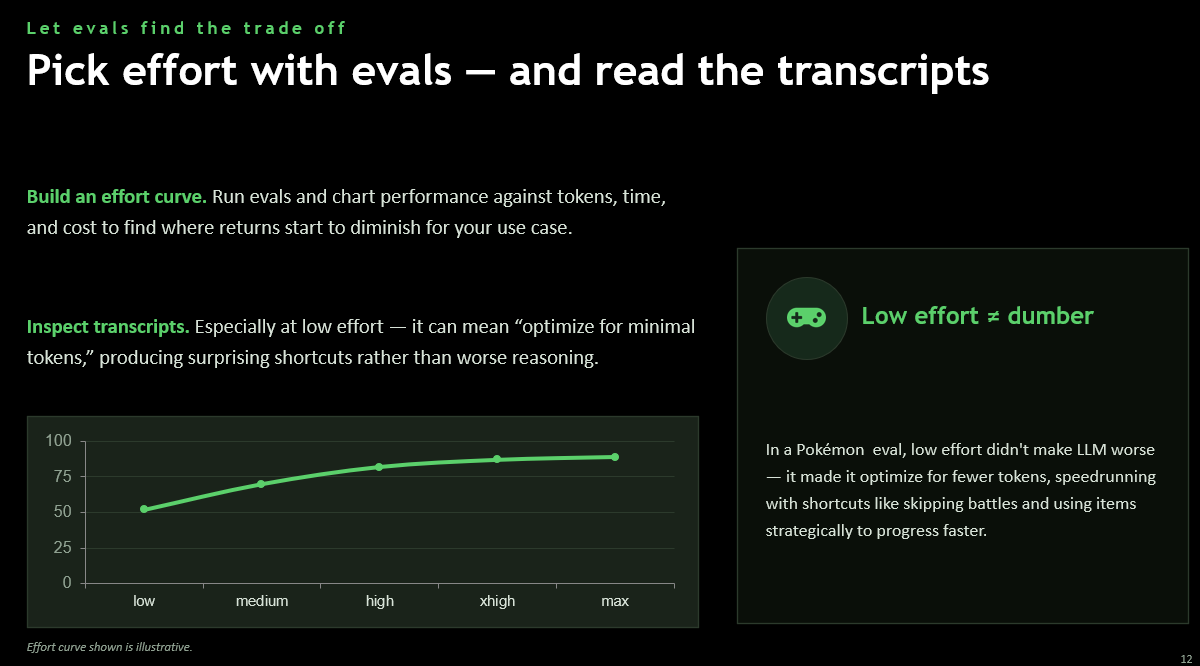
Build an effort curve: run evals and chart performance against tokens, time, and cost to find where returns start to diminish for your use case. Then inspect the transcripts, especially at low effort - a lower score doesn't always mean the model got dumber. In one Pokémon-playing eval, low effort didn't make the model worse at all; it made the model optimise for fewer tokens, speedrunning with shortcuts like skipping battles and using items strategically to progress faster. Low effort ≠ dumber - it can just mean a different (and sometimes smarter) strategy for the token budget it was given.
Maximize prompt caching - the single biggest free lever
Of all the Tier A wins above, prompt caching has the largest, most consistent payoff, because it costs you nothing and needs no judgement call.
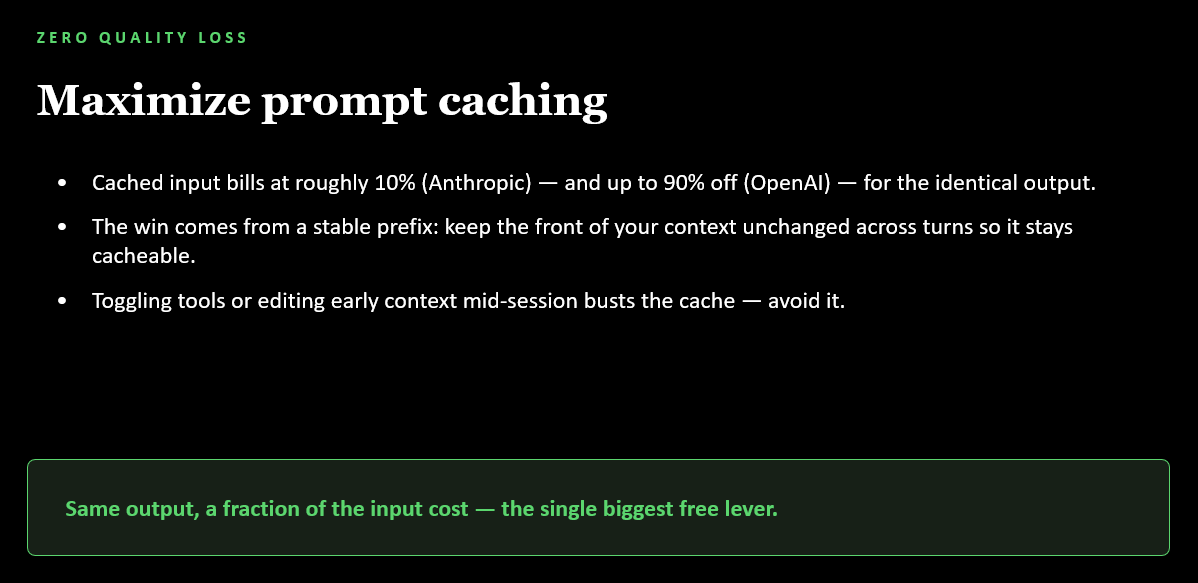
- Cached input bills at roughly 10% (Anthropic) and up to 90% off (OpenAI) - for the identical output.
- The win comes from a stable prefix: keep the front of your context unchanged across turns so it stays cacheable.
- Toggling tools or editing early context mid-session busts the cache - avoid it.
Same output, a fraction of the input cost
This is the single biggest free lever available to you. There's no quality trade-off - you just have to avoid the handful of actions that invalidate it.
How it works: caching is an exact prefix match, hashed and reused. The cached prefix is assembled in a fixed order - tools, then system prompt, then messages - and changing anything earlier in that chain invalidates everything after it.
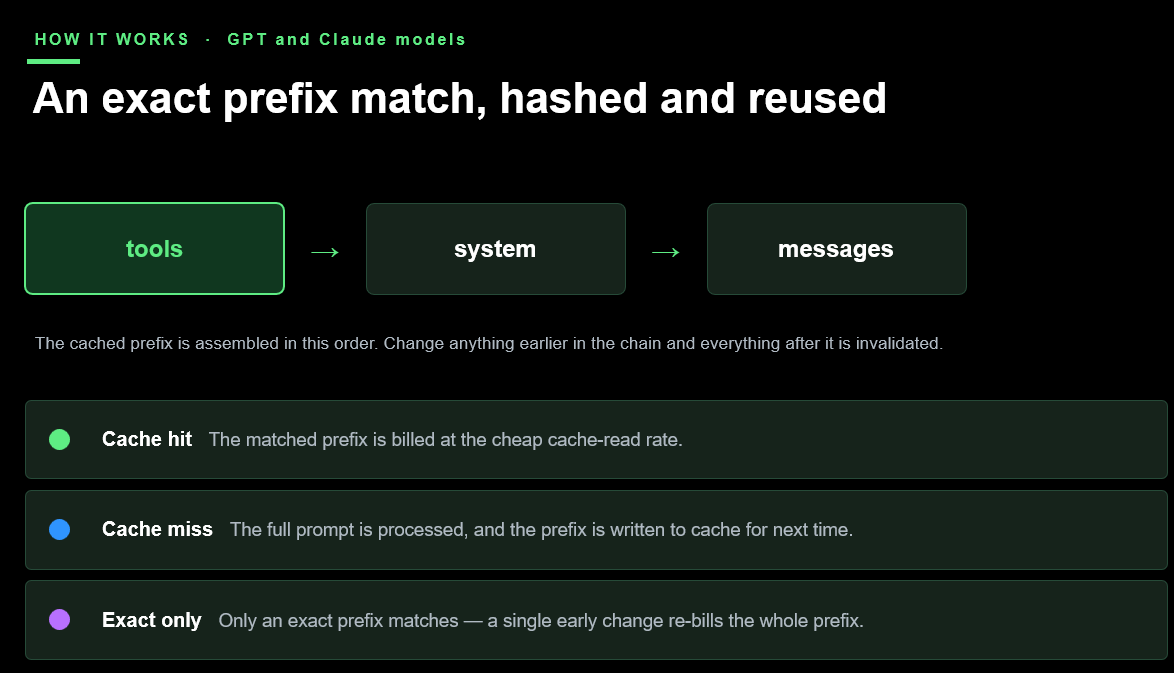
- Cache hit - the matched prefix is billed at the cheap cache-read rate.
- Cache miss - the full prompt is processed, and the prefix is written to cache for next time.
- Exact only - only an exact prefix match counts; a single early change re-bills the whole prefix.
Caches also don't live forever, and the lifetime varies by provider:
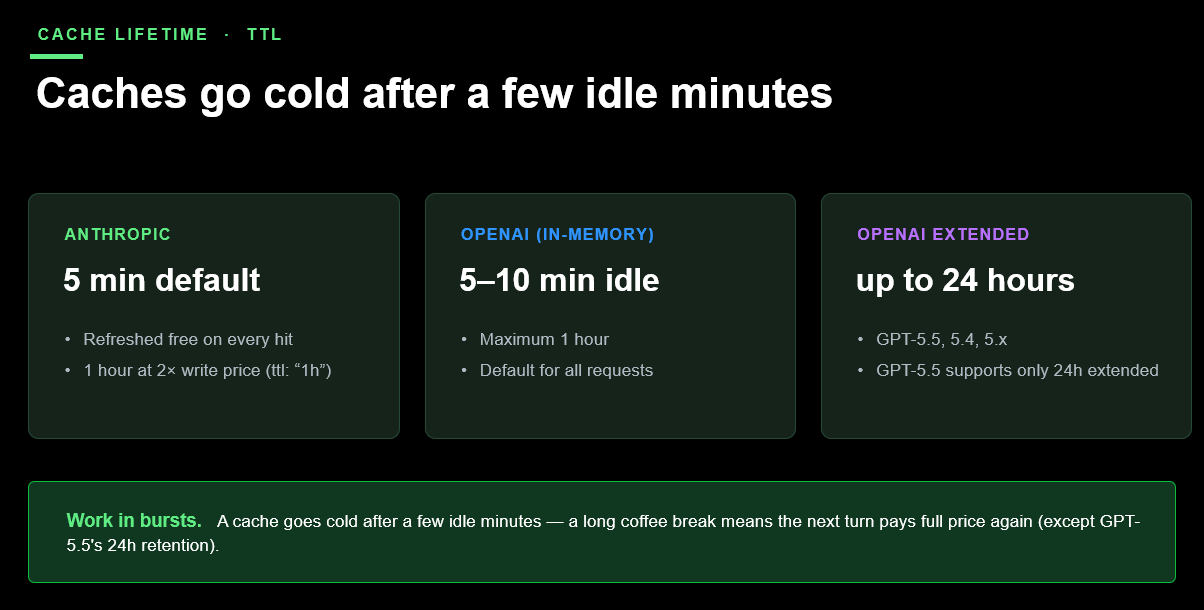
- Anthropic - 5 minute default, refreshed free on every hit, or 1 hour
at 2x the write price with
ttl: "1h". - OpenAI (in-memory) - 5–10 minute idle, maximum 1 hour, the default for all requests.
- OpenAI extended - up to 24 hours, on GPT-5.4, GPT-5.5, and newer.
The practical implication: work in bursts. A cache goes cold after a few idle minutes - a long coffee break means the next turn pays full price again, except on models with 24-hour extended retention.
This is exactly the mechanism behind the VS Code and GitHub Copilot production numbers covered earlier on this page - the same caching controls, tuned and measured at scale:
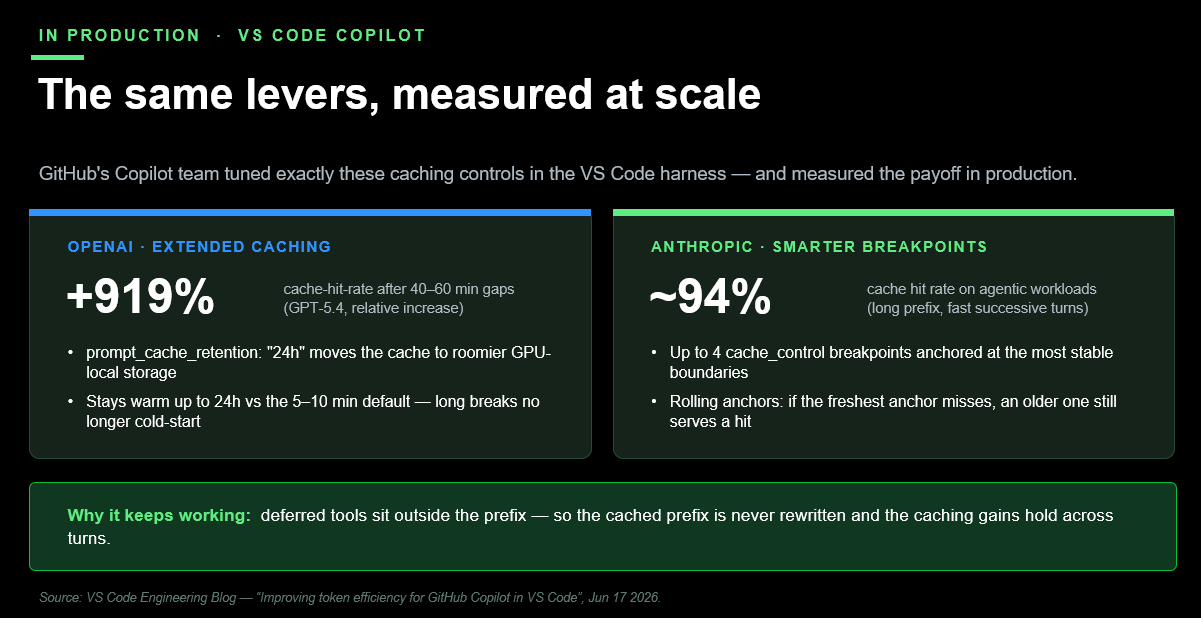
- OpenAI extended caching - a +919% relative increase in cache-hit
rate after 40–60 minute gaps (GPT-5.4).
prompt_cache_retention: "24h"moves the cache to roomier GPU-local storage, staying warm up to 24 hours versus the 5–10 minute default - long breaks no longer cold-start. - Anthropic smarter breakpoints - ~94% cache hit rate on agentic
workloads. Up to 4
cache_controlbreakpoints anchored at the most stable boundaries, with rolling anchors so that if the freshest one misses, an older one still serves a hit. - Why it keeps working - deferred tools (from tool search) sit outside the prefix, so the cached prefix is never rewritten and the caching gains hold across turns.
Knowing what breaks a cache is just as important as knowing what builds one:
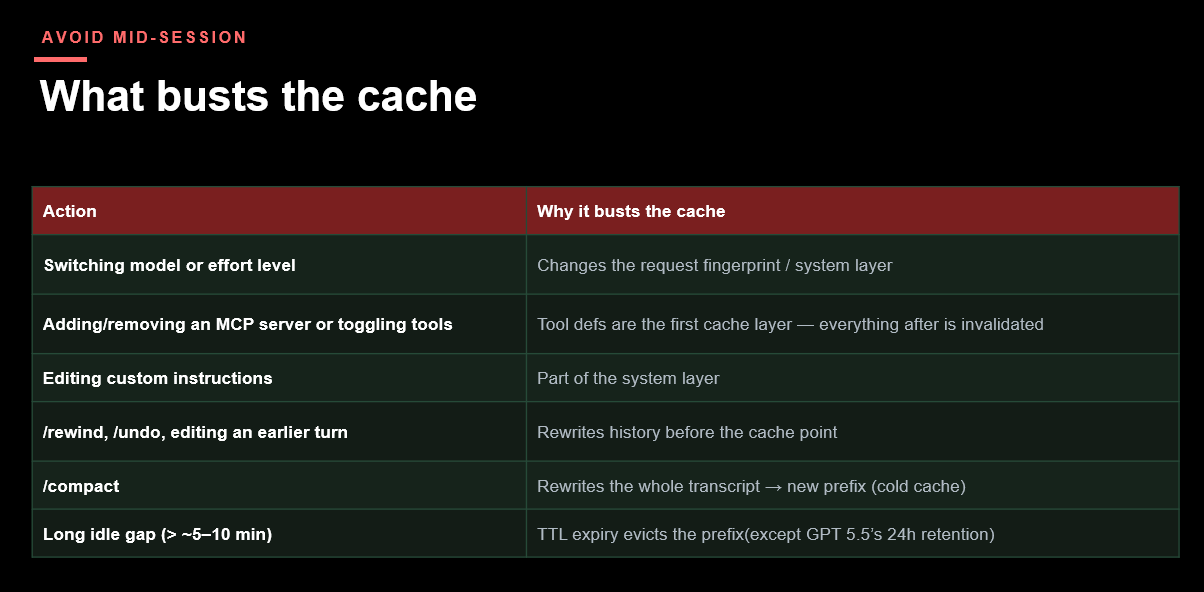
| Action | Why it busts the cache |
|---|---|
| Switching model or effort level | Changes the request fingerprint / system layer |
| Adding/removing an MCP server or toggling tools | Tool defs are the first cache layer - everything after is invalidated |
| Editing custom instructions | Part of the system layer |
/rewind, /undo, editing an earlier turn |
Rewrites history before the cache point |
/compact |
Rewrites the whole transcript → new prefix (cold cache) |
| Long idle gap (> ~5–10 min) | TTL expiry evicts the prefix (except GPT-5.5's 24h retention) |
Put together as a checklist for your own Copilot CLI sessions:
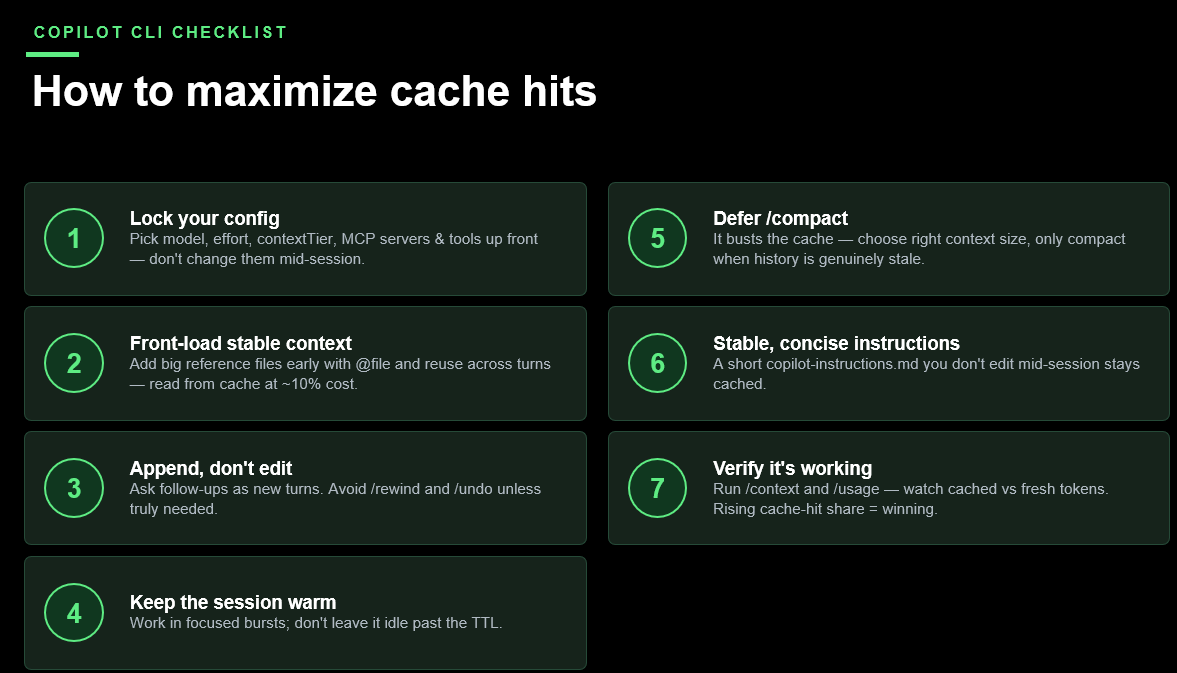
- Lock your config - pick model, effort, context tier, MCP servers and tools up front, don't change them mid-session.
- Front-load stable context - add big reference files early with
@fileand reuse across turns, read from cache at ~10% cost. - Append, don't edit - ask follow-ups as new turns; avoid
/rewindand/undounless truly needed. - Keep the session warm - work in focused bursts; don't leave it idle past the TTL.
- Defer
/compact- it busts the cache, so choose the right context size and only compact when history is genuinely stale. - Stable, concise instructions - a short
copilot-instructions.mdyou don't edit mid-session stays cached. - Verify it's working - run
/contextand/usage, watch cached vs fresh tokens; a rising cache-hit share means you're winning.
Context window mechanics and context rot
Zooming out from caching specifically: every agent turn is really two loops stacked on top of each other, and understanding the shape of that loop explains why caching (and compaction) matter so much.
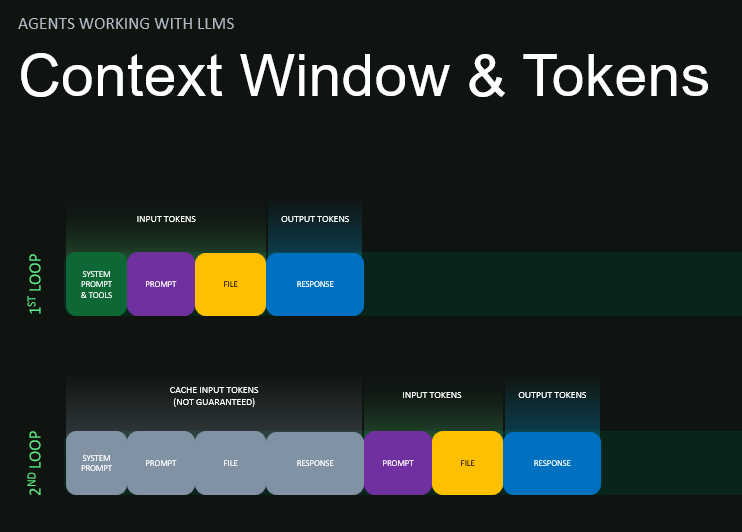
On the first loop, the model processes system prompt & tools, your prompt, file content, and produces a response - all counted as input and output tokens. On the second loop, everything from the first loop becomes cache input tokens (not guaranteed to hit), with only the new prompt, file, and response counted as fresh input/output. This is exactly why a stable prefix matters: the bigger that reusable first chunk, the cheaper every subsequent turn becomes.
But a bigger context window isn't free of downsides even when it's cached - models don't treat all tokens in a long context equally:
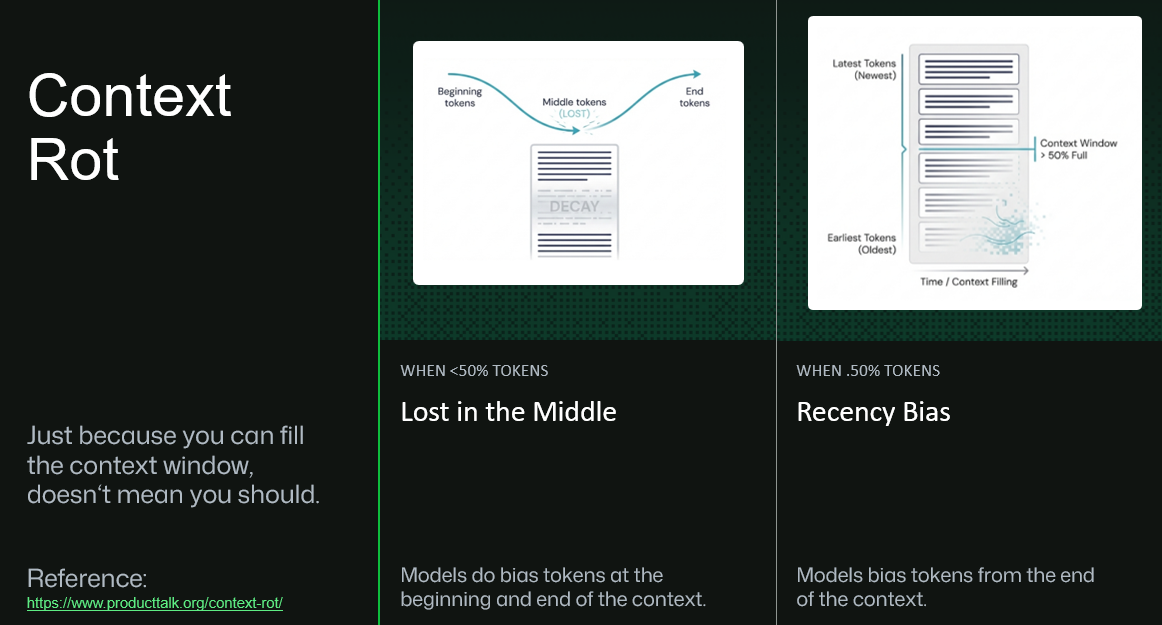
Just because you can fill the context window, doesn't mean you should.
- Lost in the Middle (when context is under ~50% full) - models bias attention toward tokens at the beginning and end of the context; content in the middle can effectively decay and get overlooked.
- Recency Bias (when context is over ~50% full) - models increasingly bias toward the end of the context, at the expense of earlier information.
(Reference: productalk.org/context-rot)
The practical fix for both problems is the same one already in your Tier A toolkit - keep unrelated exploration out of your main thread entirely:
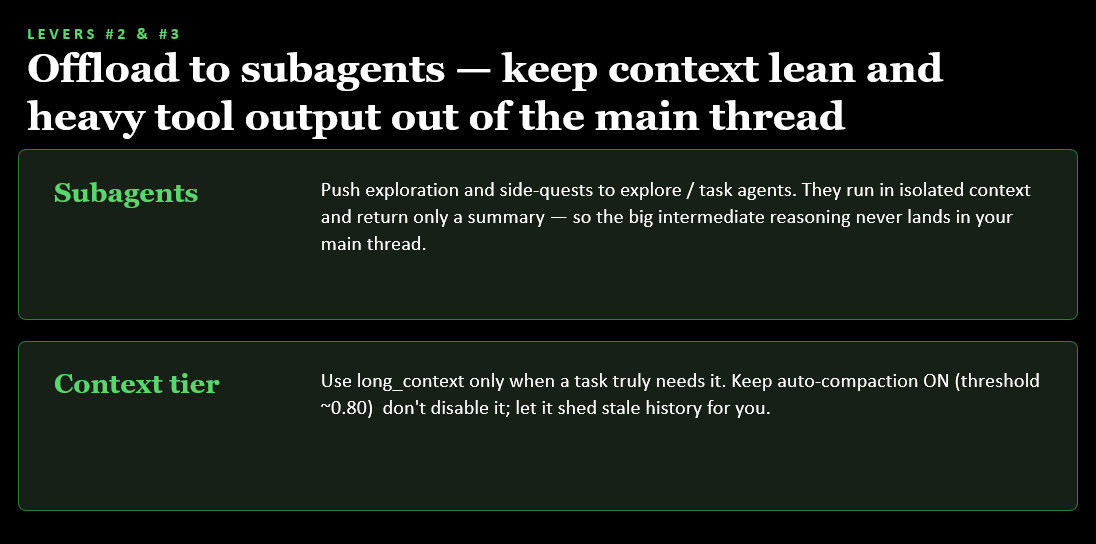
- Subagents - push exploration and side-quests to explore/task agents. They run in isolated context and return only a summary, so the big intermediate reasoning never lands in your main thread.
- Context tier - use
long_contextonly when a task truly needs it. Keep auto-compaction on (threshold ~0.80) - don't disable it; let it shed stale history for you rather than fighting it.
Why this matters beyond the token bill
Token efficiency isn't just a cost story - engaged, efficient Copilot usage correlates with meaningfully better delivery outcomes:
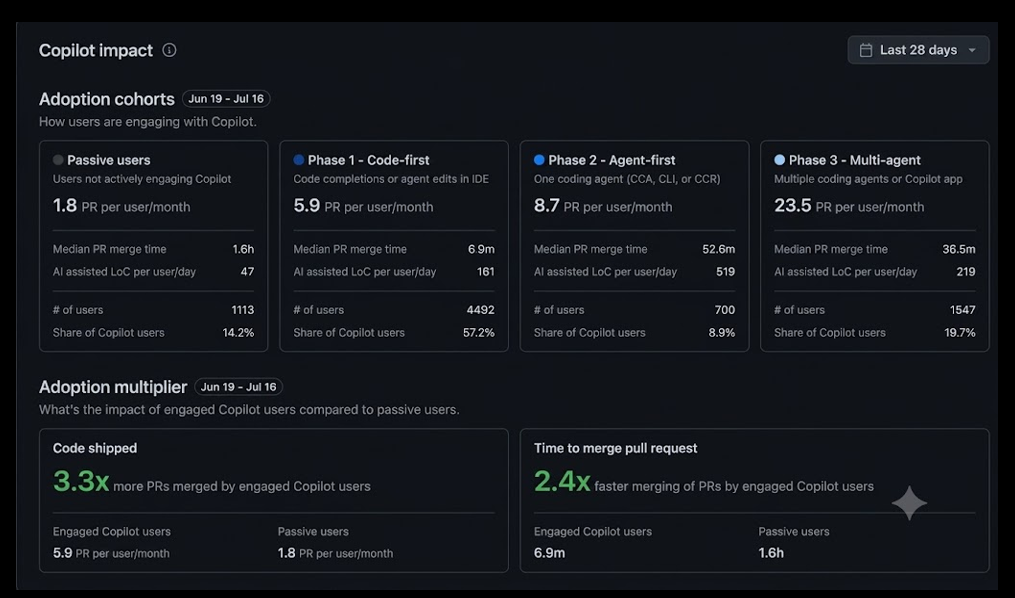
Across adoption cohorts - from passive users through code-first, agent-first, and multi-agent phases - pull requests per user per month climb sharply (1.8 → 5.9 → 8.7 → 23.5), while median PR merge time falls. Comparing engaged Copilot users to passive users over the same period: 3.3x more PRs merged and 2.4x faster time to merge. Efficient context and token usage is what makes it practical to sustain that level of engagement without the cost or latency spiralling alongside it.
Cost and performance follow context
Every extra token in context is a token that has to be processed on every subsequent turn - it isn't free just because it was "already there." That means context choices are also cost and latency choices:
Rule of thumb
Treat context like a budget, not a bucket. Before letting an agent read a large file or paste in verbose tool output, ask whether a smaller, targeted read would do - the answer is usually yes.
A real-world case study: optimizing GitHub's own agentic workflows
The theory above plays out at scale in GitHub's own repositories. GitHub runs hundreds of agentic workflows for CI and maintenance - triaging issues, reviewing pull requests, checking compiler quality - and in April 2026 the team started systematically measuring and cutting their token usage. The full write-up is worth reading end to end, but three findings map directly onto the techniques above.
Unused tools are expensive to carry
Every registered MCP tool's name and JSON schema rides along on every single API call, whether it's used or not. A 40-tool GitHub MCP server can add 10–15 KB of schema per turn - pure overhead if the agent only ever calls two or three of them. Pruning unused tools cut 8–12 KB of per-call context with no change in behaviour.
The cheapest LLM call is the one you don't make
Deterministic data-gathering - fetching a PR diff, issue metadata, or file contents - doesn't need a model in the loop at all. Moving those reads into plain gh CLI calls before the agent starts (or via a lightweight proxy) removes a full reasoning round-trip per fetch. One workflow saw a sustained 62% reduction in effective token cost this way.
Not all tokens cost the same
Output tokens are roughly 4x the weighted cost of input tokens, and cache-read tokens are a fraction of the cost of fresh input. GitHub uses an "Effective Tokens" metric - ET = m × (1.0×I + 0.1×C + 4.0×O) - to normalise savings across model tiers, so a 10% ET reduction reflects a genuine cost reduction rather than a model swap in disguise.
The broader lesson for any agent session - not just scheduled CI workflows - is the same one from earlier in this page: scope what the agent can see and call, prefer deterministic retrieval over agentic tool calls where the answer is fixed, and measure before you optimise. A misconfigured rule or an unused tool can silently double your cost without anyone noticing until someone looks at the numbers.
Learn more: Improving token efficiency in GitHub Agentic Workflows.
The harness matters too: efficiency inside VS Code
The case study above is about optimising what an agent is asked to do. There's a second, equally important layer: optimising the harness that runs the agent - the code that builds every request, manages the prompt, and talks to the model provider. The VS Code team's own write-up on token efficiency digs into exactly this, and it comes down to the same two repeating costs seen from a different angle:
The prompt prefix and caching
System instructions, tool definitions, repository context, and conversation history repeat across nearly every turn. When a request's prefix exactly matches a prior one, the provider can reuse cached model state instead of recomputing it - cached tokens can be up to 10x cheaper, with lower latency too.
Tool-definition overhead
Every registered tool's full schema is normally sent on every request. Tool search lets the model see only a lightweight name + description upfront, loading the full schema on demand only for tools it actually searches for and uses - keeping the cached prefix intact and the context window leaner.
Two provider-specific techniques stood out in VS Code's own experiments:
- Extended prompt caching (OpenAI models) - keeping the prefix cache warm for up to 24 hours instead of the default few minutes meant a 300–900% relative increase in cache hit rate after a 30–60 minute gap between requests, i.e. picking a session back up later is now far more likely to hit cache.
- Smarter cache breakpoints (Anthropic models) - deliberately anchoring Anthropic's fixed cache-breakpoint budget at the most stable parts of the prompt (end of tool definitions, end of system prompt, plus a rolling pair of recent-message anchors) pushed agentic session cache hit rates to around 94%.
- Tool search (both providers) - reduced total tokens per turn by roughly 9–11%, and cut total session token usage for the median user by 9–18% depending on the model and provider.
The takeaway for you as a Copilot user: you don't have to implement any of this yourself, but it explains why the advice in the next section works - staying on one model and toolset for a session, and picking sessions back up promptly, both help the harness keep your prompt cache warm and your tool overhead low.
Learn more: Improving token efficiency in GitHub Copilot (VS Code blog).
Optimizing your own day-to-day AI usage
The GitHub case study above is about scheduled CI workflows, but the same principles apply directly to your everyday Copilot sessions. GitHub's Optimizing your AI usage tutorial distils this into eight practical habits:
1. Match the model to the task
Reasoning models for architecture and hard debugging, mid-tier models when the plan is already clear, lighter models for routine refactors and formatting. Auto model selection routes each prompt to a suitable model automatically - and gets you a 10% cost discount on paid plans.
2. Write clear, scoped prompts
A clear task definition, relevant context up front, and an explicit stopping condition all cut down on retries and scope drift - without meaningfully increasing token usage themselves.
3. Keep context lean
Start a new conversation (/new) when you switch problems, run /compact to shrink a long session you still need, check usage with /context, maintain a good AGENTS.md / copilot-instructions.md, and only enable the MCP toolsets you actually need.
4. Preserve the cache
Cached tokens are typically billed at ~10% of fresh input cost - but switching models, changing reasoning level, or toggling tools mid-session invalidates that cache. Pick your settings up front and leave them alone for the session.
5. Set AI credit session limits
Cap how much a single session can spend in Copilot CLI or the SDK - the agent stops cleanly and lets you decide whether to raise the limit, rather than silently running up a bill.
6. Research, plan, then implement
Doing all three in one session lets irrelevant context pile up. Plan with a strong reasoning model (/plan in the CLI), then implement with a cheaper one in a fresh session.
7. Turn learnings into instructions
Use /chronicle tips and /chronicle cost-tips to surface recurring inefficiencies from your own session history, then encode the fix directly into copilot-instructions.md so it applies to every future session.
8. Add deterministic guardrails
Unit tests, linters, and security scans give the agent a fast pass/fail signal, which stops small errors from compounding into long, expensive chains of incorrect changes.
Learn more: Optimizing your AI usage to maximize efficiency and reduce cost.
Bringing it back to today's other sessions
The same governance and surface choices from Getting hands on with the
GitHub App and CLI directly affect context behaviour -
for example, /worktree isolates a session's context from the rest of your
work, and session history can be shared across surfaces via the same
runtime. When you get to GitHub SDK and Microsoft Foundry,
you'll see that building your own harness means these context decisions
become your responsibility as the app developer, not something a
pre-built surface handles for you.