Slide 13 · Layer 2: Identity and Least Privilege
Would you give a new intern the admin password and unsupervised access to your production database on day one? No. But that is effectively what many teams do when they deploy AI agents.
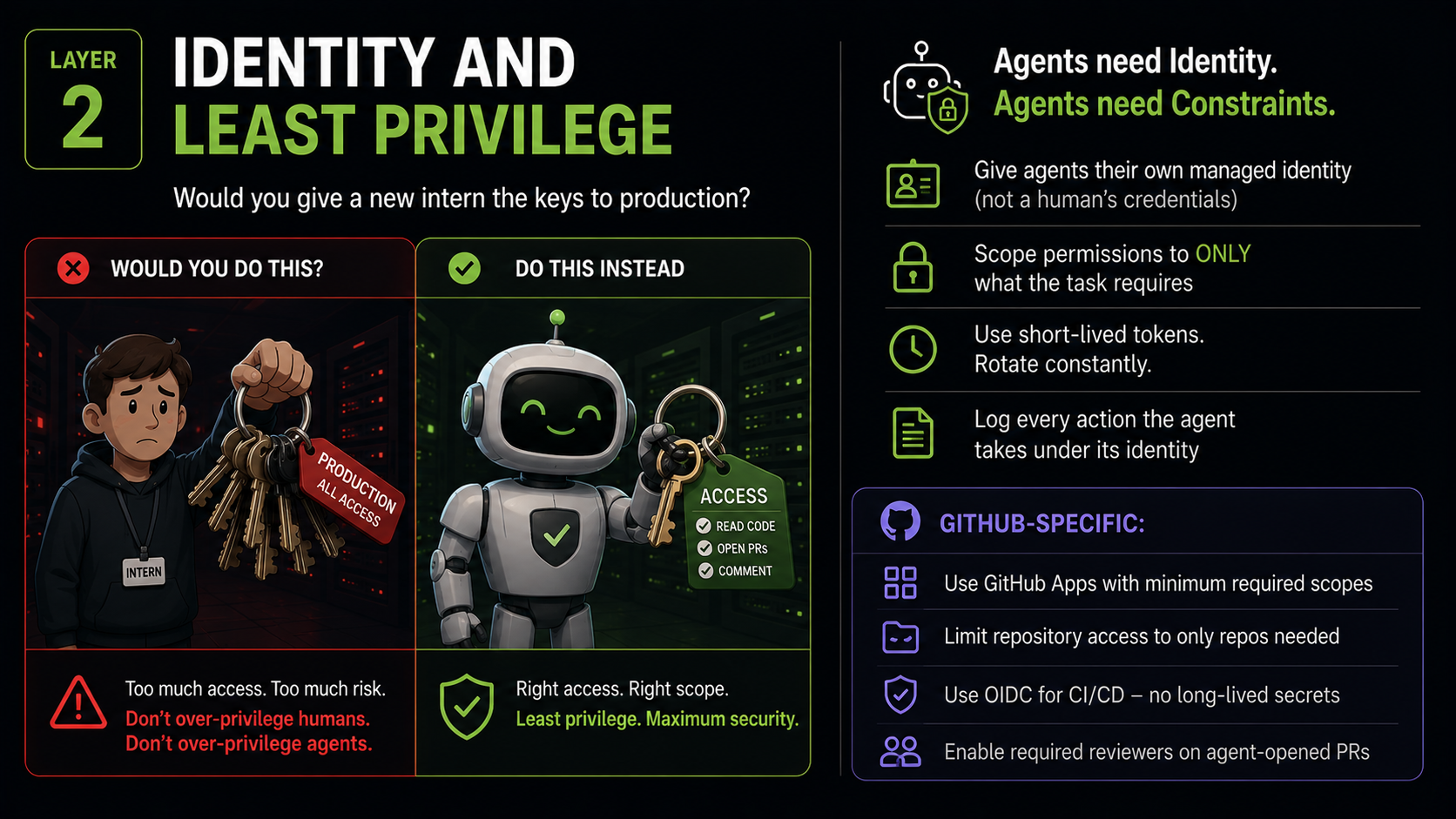
The Identity Problem in Agent Deployments
The most common identity mistake when deploying agents is authenticating as a human. A developer builds an agent, uses their own personal access token for convenience, and ships it. It works. And it is a significant security failure for five reasons:
- Overpermissioned by default. The token has every permission the human has - which is almost certainly far more than the agent requires for its specific task.
- Unattributable actions. Audit logs show the human's account taking actions. When an incident occurs, investigators cannot distinguish which actions were taken by the human and which by the agent operating under their identity.
- Fragile dependency. When the human leaves the organisation and their account is deactivated, the agent breaks. The agent's availability is coupled to a person's employment status.
- No independent revocation. If the agent is compromised, revoking its access means revoking the human's access. There is no way to isolate the problem.
- Shared secrets. The credential used by the agent is the same one the human uses elsewhere. A credential leak from the agent's deployment exposes the human's access across all systems.
The correct approach: Agents get their own identity. A non-human identity, distinct from any human account, with the minimum permissions required for the specific task.
GitHub Apps: The Right Tool for GitHub Agents
For agents operating in GitHub, GitHub Apps are the purpose-built identity mechanism. Compared to Personal Access Tokens (PATs), a GitHub App:
- Has a distinct identity - it appears in audit logs as a named non-human actor, separate from any user.
- Can be granted access to specific repositories only - not "everything this user can access."
- Uses installation tokens that are automatically short-lived and rotated, not static long-lived secrets.
- Has granular permission scopes - read access to Issues is a separate scope from write access to code, which is a separate scope from administration.
- Is independently revocable - removing the GitHub App's installation does not affect any human account.
Practical Permissions Design
For a PR review agent, the permission set should be:
| Permission | Level | Justification |
|---|---|---|
| Pull requests | Read | To read the PR content and changed files |
| Pull requests | Write (comments only) | To post review comments |
| Issues | None | Not required for PR review |
| Contents | Read | To read file contents in the diff |
| Contents | Write | Not required - remove this |
| Actions | None | Not required for PR review |
| Administration | None | Never required |
Every permission that is "not required" should be absent. Not "read-only for safety" - absent entirely. If it is not in the tool registry, no injection can use it.
OIDC: No Long-Lived Secrets in CI/CD
For agents that run in GitHub Actions workflows, OIDC (OpenID Connect) eliminates the need for long-lived credentials entirely.
The traditional pattern is: generate a cloud provider credential (AWS access key, Azure service principal secret, GCP key file), store it as a GitHub Actions secret, and use it in the workflow. These credentials are long-lived, static, and if leaked - through a log statement, a debug output, or an agent-generated code change - they remain valid until manually rotated.
The OIDC pattern replaces this: 1. The workflow requests a short-lived JWT from GitHub's OIDC provider at the start of the run. 2. The cloud provider (AWS, Azure, GCP) trusts this JWT and exchanges it for a temporary access token scoped to the specific workflow run. 3. The temporary token expires automatically when the run completes. 4. No long-lived credential is ever stored anywhere.
An agent running in a GitHub Actions workflow that uses OIDC has credentials that: - Are valid for one run only. - Cannot be stolen and reused. - Leave a clear audit trail of exactly which workflow run requested them.
Required Reviewers: Human in the Loop by Design
For supervised agents (Level 2 on the autonomy spectrum), the most important control is a required reviewer gate on any PR the agent opens. This is enforced at the repository level - not in the agent's system prompt, not in a request to the model to "always ask for review."
Implementation:
- Enable branch protection on the main branch (or any target branch the agent can open PRs against).
- Configure Required reviewers - at minimum one human reviewer must approve before merge.
- Verify that the agent identity itself is excluded from the set of valid approvers - an agent cannot approve its own PR. This is a GitHub setting under branch protection.
- Optionally, configure a CODEOWNERS file to require review from a security-focused team for changes to security-sensitive paths, regardless of who opens the PR.
With this configuration, the agent can do everything up to opening a PR and requesting review. Merge requires a human. That one gate dramatically reduces the blast radius of agent errors and manipulations.
The Intern Analogy, Fully Developed
When a new intern joins your security team, you apply five principles automatically:
- Named account - their actions are attributed to them specifically, not to a shared account.
- Scoped access - access only to the systems required for their specific work, not everything you can access.
- Read before write - they observe and learn before they take actions with external consequences.
- Reviewed work - a senior person reviews their output before it affects production.
- Clean offboarding - when their role ends, their access is revoked without affecting anyone else.
Apply exactly these five principles to every agent you deploy. The parallel is exact, and the reasoning is the same: the risk of a mistake, manipulation, or compromise should be bounded by the scope of access, not unlimited.
Credential Hygiene for External Tool Access
Agents often need credentials to call external tools - third-party APIs, databases, cloud services. The principles:
- Never embed credentials in system prompts or agent code. They will appear in logs, in reasoning traces, and potentially in model outputs.
- Use secret management services to inject credentials at runtime: GitHub Secrets, Azure Key Vault, AWS Secrets Manager. The agent requests the credential at runtime; the credential is never stored in the agent's configuration.
- Enable secret scanning with push protection on all repositories where agent code is developed. Agents generating code can accidentally embed credentials in their output. Push protection blocks the push before it reaches the repository.
- Log every credential use - which agent identity used which credential, when, to call what endpoint. Anomaly detection on credential usage patterns is a valuable security signal.